

LinkedIn Launches Tool To Make In-Person Events Easier to Organize
The businesss professiobal platform LinkedIn has added a new tool that will make it easier to plan these kinds of in-person networking events.
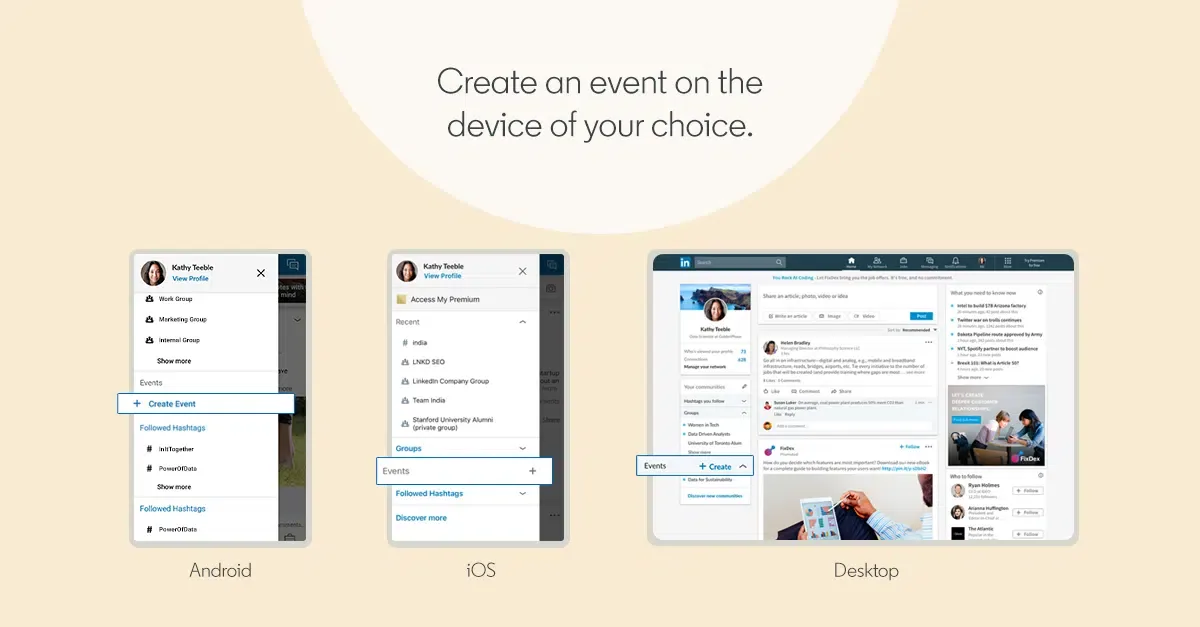
LinkedIn has cemented itself as a platform for business owners and professionals who want to connect with potential clients and other members of their industry. For modern, busy professionals, holding conversations online is more convenient than face-to-face meetings, but there are times when such in-person interactions are necessary. LinkedIn has added a new tool that will make it easier to plan these kinds of in-person networking events.
Last week, LinkedIn began a worldwide rollout of a new Event Hub tool. This tool will make it easier to plan and coordinate in-person events. Users will be able to create and join professional events, invite connections, manage events, have conversations with other attendees, and stay in touch afterward.
Many situations exist where it’s ideal, or in some cases necessary, for groups to meet in person to handle professional matters. With the Event Hub tool, business professionals will be able to handle all of the pre-planning online. In-person events can even be used to help build a professional’s LinkedIn network. According to LinkedIn’s data, people are twice as likely to accept a connection request if they attended a face-to-face meeting with that person or company.
To plan an event, go to the ‘Community’ panel located on the left side of the newsfeed and click “+Create.” This is where the user adds basic information, such as a description, date and time, and venue location. Users will then be able to add their people in their connections to attend the event. LinkedIn has made it simple to find the right people to invite by including filters such as location, company, industry, and school. Aside from inviting people directly, users can also share the event as a post to reach relevant potential attendees.
The events page the user creates has several features to help ensure people stay up to date on the upcoming event. As the company described in an article announcing the new feature, “From your event page, you can easily track attendees and invitees, post updates, and interact with other attendees. LinkedIn’s algorithm automatically provides timely and relevant notifications to attendees to make sure they don’t miss any important updates about your event. Members who have joined the event can also invite people from their own networks to attend.”
Another potential benefit of using Event Hub is that it makes it easier for people to find your event. People who were invited to an event will see invites in their ‘My Network’ tab, where they can view the event and choose to attend. Even if the person wasn’t directly invited, they could discover the events shared by your members of their network by looking at their LinkedIn feed. You never know when someone who you thought wouldn’t be interested in an event is actually eager to attend.
According to testimonials provided by LinkedIn, the people involved in the pilot program have rave reviews for the new event system.
“What I really like about LinkedIn Events is the fact that I can plan an event with my network and not be required to go to another platform to organize the event,” says Michael Quinn, senior manager at EY in Washington, adding, “I’ve organized events all across the country, and LinkedIn Events made it incredibly easy for me to market those events and invite my connections local to that specific location. Since I was sharing the event through a post, it also enabled my network to share the event with people they felt would be interested in attending.”
Marketers can start using this tool now to plan in-person events to grow their brand. For more recent news about marketing, read this article on the latest changes from Google.
Quick check
Is your site built for AI search?
Does each service have its own page with the answer up top?
Is your main answer in the first 60 words of the page?
Do your headings match how customers actually search?
Does your site load fast and stay clean on mobile?
Do your pages have schema (FAQ / Article) marking them up?
More on Social Media


Built and managed thousands of WordPress, Wix, and Shopify sites, plus hundreds on Squarespace, GoDaddy, BigCommerce, Duda, and Weebly.
